9 min read
Caddy vs Nginx: Which Should You Choose for Production?
Compare Caddy and Nginx in performance, security, HTTPS, Docker, and Cloudflare integration to choose the right reverse proxy for your project.
On this page
When you take a web project live, one of the important decisions is which web server or reverse proxy to put in front of your application. For years, Nginx has been one of the most common answers to this question. Caddy, however, has become a strong alternative, especially with its automatic HTTPS management and simple configuration approach.
So which one should you choose for a real production environment?
In this article, we will compare Caddy and Nginx in terms of performance, security, SSL/TLS, HTTP/3, reverse proxying, and operational maintenance. Using scenarios that involve Next.js, NestJS, Docker, and Cloudflare, we will look at which technology suits which needs.
What Are Caddy and Nginx?
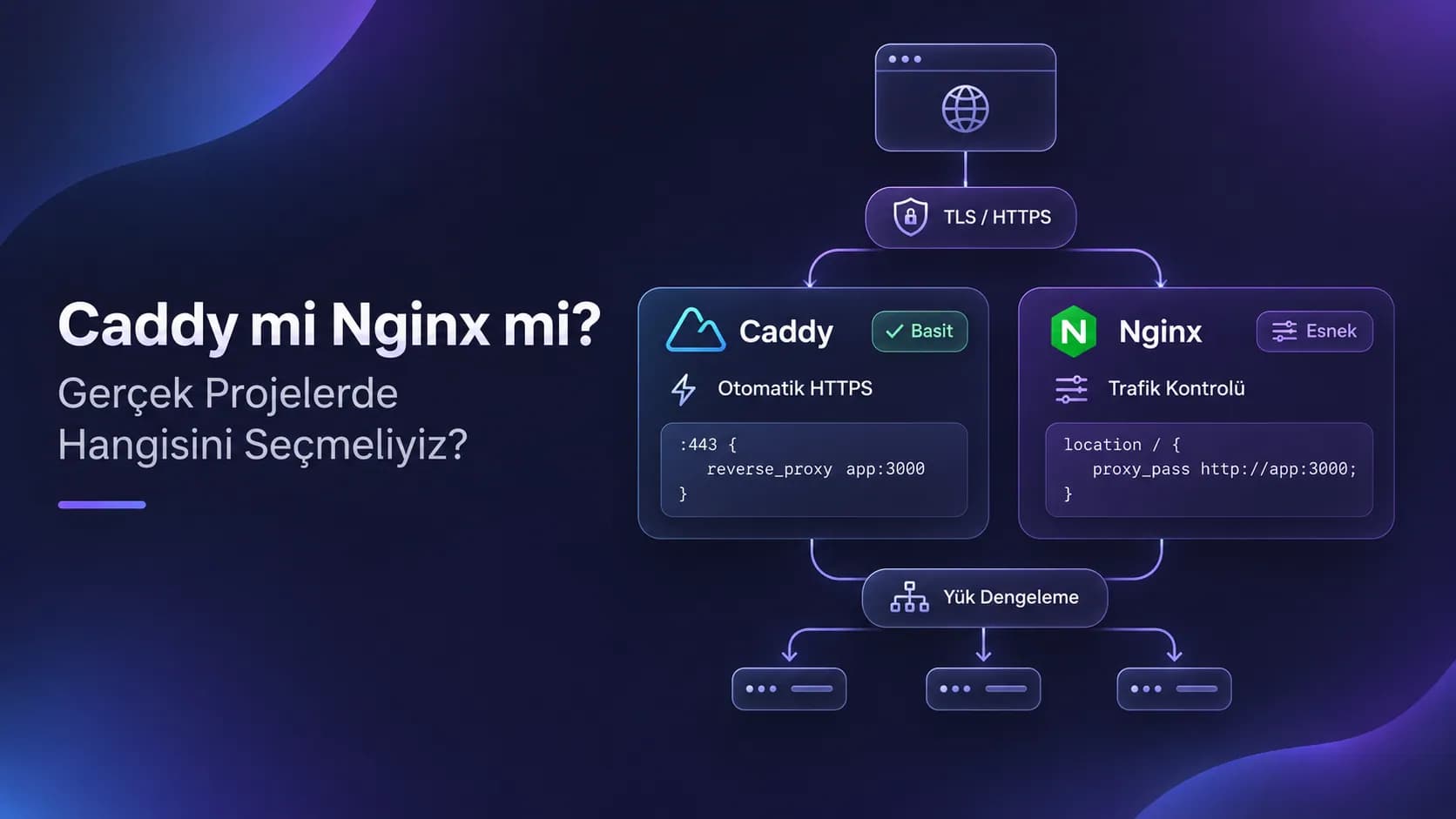
Nginx is a web server with an event-driven architecture, widely used for static file serving, reverse proxying, load balancing, and HTTP traffic management. Its long history in production environments has given it a mature ecosystem and extensive configuration options.
Caddy, on the other hand, is a web server written in Go that provides modern HTTPS management by default. Thanks to its simple configuration format called the Caddyfile, you can get started with less configuration in many scenarios.
There is an important distinction here: Nginx Open Source and NGINX Plus do not have the same features. NGINX Plus offers commercial support and additional capabilities such as active health checks.
Caddy's standard distribution supports both active and passive health checks. However, for DNS provider integrations and some advanced features, you may need external modules.
Performance: Let's Not Decide Without Measuring
When it comes to performance, it would not be accurate to say that Nginx is always faster than Caddy, or that Caddy performs better thanks to its modern architecture.
Nginx has a very mature architecture, especially for high numbers of concurrent connections and static content delivery. Caddy, meanwhile, can deliver good results across different traffic profiles by taking advantage of Go's concurrency model.
However, real-world performance depends on the hardware, TLS configuration, number of connections, the upstream application, and the nature of the requests.
For example, if a Next.js or NestJS application has a slow database query, replacing the reverse proxy will not solve that problem.
For this reason, before choosing, it is more sensible to run load tests with tools like k6, and to examine p95 and p99 latency values, CPU usage, and memory consumption.
Security and Configuration Approach
One of the major differences between Nginx and Caddy is how secure configuration is managed.
Nginx gives you detailed control over TLS protocols, security headers, and connection behavior. However, this flexibility also brings the responsibility of preparing and maintaining the configuration correctly.
Caddy, on the other hand, reduces the initial operational burden with modern TLS defaults, automatic certificate management, and automatic redirection from HTTP to HTTPS.
That said, no web server meets all security requirements with its default configuration alone.
With both technologies, you should evaluate a Content-Security-Policy, Strict-Transport-Security, and other security headers that suit your application. It is also important to obtain the real client IP address from trusted sources when you are behind a reverse proxy.
SSL/TLS and Automatic HTTPS
One of Caddy's most distinctive advantages is automatic HTTPS management.
Once a domain name is defined, Caddy can obtain a TLS certificate from a trusted certificate authority, provided the necessary DNS and network conditions are met, and it handles the renewal process automatically.
For certificate validation, the HTTP-01 method uses port 80, while the TLS-ALPN-01 method uses port 443. Wildcard certificates require DNS-01 validation, which may require an additional module depending on your DNS provider.
On the Nginx side, certificate management is usually handled through Certbot, ACME clients, or enterprise certificate infrastructure.
Although this approach requires additional configuration, it may suit organizations that want to manage the certificate lifecycle through a separate system.
In small and medium-sized projects, Caddy's automatic HTTPS approach offers a clear convenience, while in environments that already have certificate automation in place, this difference may matter less.
HTTP/3 Support
HTTP/3 runs on the QUIC protocol. It can offer advantages, particularly on connections with packet loss or variable network conditions.
Caddy provides HTTP/3 support by default, under the right configuration and network conditions.
In Nginx, HTTP/3 support was introduced in version 1.25.0. However, the relevant module must be included in the distribution you are using, and the necessary configuration must be in place.
With both solutions, it is important that UDP port 443 traffic is accessible for HTTP/3.
If you use a CDN such as Cloudflare, the HTTP version between the client and Cloudflare may differ from the HTTP version between Cloudflare and your origin server. Therefore, users connecting over HTTP/3 does not mean the origin server must also use HTTP/3.
Reverse Proxy Configuration
Let's assume a Next.js application runs on port 3000 and a NestJS API runs on port 4000.
Let's also assume that both applications run on the same Ubuntu server, outside of Docker.
Caddy Configuration
app.ornek.com {
    encode zstd gzip

    header {
        X-Content-Type-Options nosniff
        Referrer-Policy strict-origin-when-cross-origin
    }

    reverse_proxy 127.0.0.1:3000 {
        health_uri /api/health
        health_interval 10s
    }
}

api.ornek.com {
    encode zstd gzip
    reverse_proxy 127.0.0.1:4000
}
Here, it is assumed that the /api/health endpoint returns HTTP 200 when healthy. Caddy can perform active health checks by sending requests to this endpoint at the specified intervals.
Caddy also automatically manages HTTPS certificates and the redirection from HTTP to HTTPS when the necessary conditions are met.
Nginx Configuration
server {
    listen 80;
    server_name app.ornek.com;

    return 301 https://$host$request_uri;
}

server {
    listen 443 ssl;
    http2 on;
    server_name app.ornek.com;

    ssl_certificate /etc/nginx/certs/fullchain.pem;
    ssl_certificate_key /etc/nginx/certs/privkey.pem;

    location / {
        proxy_pass http://127.0.0.1:3000;
        proxy_http_version 1.1;

        proxy_set_header Host $host;
        proxy_set_header X-Real-IP $remote_addr;
        proxy_set_header X-Forwarded-For $proxy_add_x_forwarded_for;
        proxy_set_header X-Forwarded-Proto $scheme;
    }
}
This example assumes that the certificate files have already been created and that an Nginx version supporting the http2 on directive is being used. The same structure can be applied to the NestJS API with a second server block that proxies to port 4000.
As you can see, Caddy performs a similar task with a shorter configuration.
However, a smaller line count alone does not mean superiority. When more complex traffic management or existing enterprise configurations are involved, the control options Nginx offers can become important.
Health Check Difference
Caddy's standard distribution supports active and passive health checks.
Nginx Open Source, on the other hand, offers passive health checks out of the box. Active health checks are provided under NGINX Plus; in the open source version, similar behavior can be built with additional tools or modules.
This distinction is especially important in systems where traffic is distributed across multiple backend servers.
Using Docker
Both Caddy and Nginx can be used comfortably in Docker-based architectures. However, you need to pay attention to the container network structure.
For example, if Caddy and Next.js run in separate containers, the following address is incorrect in most cases:
reverse_proxy 127.0.0.1:3000
This is because 127.0.0.1 refers to the Caddy container itself.
For services connected to the same Docker Compose network, you should use the application's service name:
reverse_proxy app:3000
When using Caddy, it is especially important to store the /data directory as a persistent volume. This directory is used for certificates and related management data. It is also recommended to keep the /config directory persistent.
On the Nginx side, configuration files and TLS certificates can be mounted into the containers. If an external certificate manager such as Certbot is used, plan to reload the Nginx configuration after renewals.
With both technologies, it is a safer approach to avoid unnecessarily exposing application ports to the internet, to keep services on appropriate Docker networks, and to publish only the necessary entry points.
Using Cloudflare
In projects that use Cloudflare, attention should be paid not only to the choice of reverse proxy but also to the trust relationship between Cloudflare and the origin server.
In production environments, it is generally recommended to use the Full (strict) SSL/TLS mode. This mode encrypts the connection between Cloudflare and the origin and validates the origin certificate.
On the origin server, you can use a certificate from a trusted certificate authority or a Cloudflare Origin CA certificate.
Another important issue is the real client IP address.
For connections coming through the Cloudflare proxy, the server may see the IP address of Cloudflare rather than the visitor's directly.
On the Nginx side, set_real_ip_from and real_ip_header can be used, while on the Caddy side, the trusted_proxies setting and, where needed, client_ip_headers can be configured.
Caddy's standard distribution includes trusted_proxies static. Dynamic source modules that automatically update Cloudflare IP ranges may require additional plugins.
For security, it is necessary to trust only verified proxy IP ranges and, where possible, to restrict direct access to the origin server through a firewall.
Which One Should You Choose for Which Project?
Personal Websites and Portfolios
For personal websites, Caddy is often a very practical choice.
Automatic HTTPS, short configuration files, and low maintenance requirements are especially advantageous for developers who manage their own infrastructure.
Nginx also handles these tasks successfully. However, if you do not already have an Nginx setup, starting with Caddy may be easier from an operational standpoint.
SaaS and Backend Projects
In SaaS projects that include Next.js, NestJS, WebSockets, and various backend services, both technologies can be used.
In systems where simple routing and automatic certificate management are sufficient, Caddy is a strong option.
In systems that require custom traffic rules, advanced access policies, or enterprise integrations, Nginx's extensive configuration ecosystem can provide an advantage.
What matters most here is the behavior the application needs, more than its size.
Enterprise Systems
In enterprise infrastructure, existing technology standards, centralized certificate management, auditability, and commercial support requirements tend to take priority.
Under these conditions, NGINX Plus in particular may be a meaningful option.
However, you should not assume that Caddy cannot be used in enterprise systems. If it meets the routing, security, and operational requirements, Caddy can also be used in production environments.
Conclusion: Which Should We Choose?
There is no single correct choice between Caddy and Nginx that applies to everyone.
Caddy offers a strong solution for projects that want automatic HTTPS, simple configuration, and operational ease. Especially for small teams and personal projects, reducing maintenance overhead is a significant advantage.
Nginx, meanwhile, maintains its strong position thanks to its mature ecosystem, configuration options, and widespread use in enterprise infrastructure.
If an existing Nginx setup is working without problems, switching to Caddy just to shorten the configuration may not always make sense. Likewise, choosing Nginx for a new project out of habit alone can create unnecessary operational overhead.
The right technology is not the one with the most features; it is the one that sustainably meets the project's needs.
So when making your choice, consider performance measurements, security requirements, team experience, and long-term maintenance costs together.